Obsidian for Research: A Practical Project Workflow
A practical Obsidian workflow for researchers to organize projects, experiments, literature, meetings and ideas with linked notes and automatic templates.

In brief
Obsidian works best for research when it is used as a connected project record—not merely as a folder full of notes. I use a project index, consistent properties, linked literature and experiment notes, and a small set of templates. This keeps observations traceable from an early idea to an experiment, figure and manuscript claim.
Research information rarely arrives in the order in which a paper is eventually written. An observation may begin in an experiment, connect to a paper read months earlier, change after a meeting and finally become part of a figure or manuscript claim.
I needed a system that could preserve those connections without forcing every thought into a rigid database. Obsidian fits this need because its notes are local Markdown files, while links, backlinks and properties allow them to behave like a connected research workspace.
Why Obsidian is useful for research
1. The files remain readable outside Obsidian
An Obsidian note is normally a plain .md file. The research record is therefore not locked inside a proprietary notebook format. It can be opened in a text editor, tracked with Git, searched with other tools or reused later on a website.
This does not remove the need for backups. It does, however, reduce dependence on one application.
2. Links preserve the reasoning behind the work
Folders answer, “Where is this file?” Links answer, “Why does this file matter?”
An experiment note can link to:
- its parent project;
- the method followed;
- the material batch used;
- a related literature note;
- characterization results;
- the figure or manuscript section it supports.
Obsidian can update internal links when a file is renamed, and its Backlinks view shows which other notes refer to the active note. This helps reveal the path from evidence to interpretation rather than leaving important relationships hidden in filenames. See the official documentation for internal links and backlinks.
3. Properties make notes consistently searchable
Properties are structured fields stored as YAML at the top of a Markdown file. A researcher can use fields such as project, sample-prefix, status, experiment-type, doi and created consistently across the vault.
The important principle is restraint. Properties should hold small, reusable facts; explanations belong in the body of the note. Obsidian supports text, lists, numbers, checkboxes, dates, date-times and tags as property types. Obsidian Properties documentation.
4. Templates reduce incomplete records
A template does more than save typing. It acts as a checklist at the moment a record is created. An experiment template can prompt for the objective, formulation, equipment settings, sample IDs, deviations, observations, raw-data location and next action.
Obsidian’s built-in Templates plugin can insert predefined content and simple variables such as the note title, date and time. Obsidian Templates documentation.
For automatic templates based on folders, prompted fields and project-folder creation, I use the community plugin Templater. Community plugins run third-party code, so I install only the plugins I understand and keep them updated. Obsidian community-plugin guidance.
The research-vault structure I recommend
Start with one vault for closely related professional research. Avoid creating a separate vault for every project; cross-project links and shared methods become harder to use.
00-Inbox/
01-Daily/
02-References/
03-Literature/
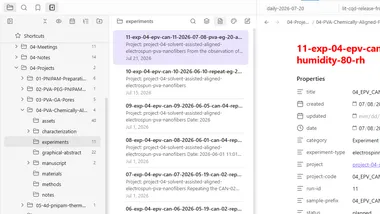
04-Projects/
  04-PVA-Chemically-Aligned-Fibers/
    project-04-solvent-assisted-aligned-electrospun-pva-nanofibers.md
    assets/
    characterization/
    experiments/
    graphical-abstract/
    manuscript/
    materials/
    methods/
    notes/
05-Meetings/
90-Templates/
99-Archive/
The numbered folders keep the major areas stable in the sidebar. Inside a project, folders reflect the actual research process. I keep raw instrument data outside the vault when files are large, but record a stable path or repository link in the corresponding experiment or characterization note.
Keep one source of truth
Store a fact once and link to it elsewhere. For example, keep the complete electrospinning procedure in a method note. In an experiment record, document only the method version, parameters used and deviations. Repeated copying creates silent inconsistencies.
The minimum set of note types
Project index
Every project begins with one index note. It defines the research question, hypothesis, scope, success criteria, milestones and active claims. It also links to experiments, literature, methods, figures and manuscript sections.
The index should remain short enough to review quickly. It is a navigation and decision page, not a second manuscript.
Experiment note
Create the experiment note before entering the laboratory. Record the intended procedure and assign sample IDs first. During and immediately after the experiment, add deviations and direct observations. Interpretation can be added later, but it should not replace the original observation.
I separate four kinds of information:
- Plan — what I intended to do.
- Execution — what I actually did.
- Observation — what I directly saw or measured.
- Interpretation — what I currently think it means.
This distinction is especially important when an unexpected morphology or property later becomes the main research claim.
Literature note
A literature note should not reproduce an abstract. It should answer:
- What problem did the authors address?
- What did they actually demonstrate?
- Which evidence supports that conclusion?
- What are the limitations?
- How does the paper affect my project or claim?
I also record the DOI and the relevant project. The reference manager remains the authority for formal citation metadata and PDFs; Obsidian holds my interpretation and its connection to ongoing work.
Research note
Use a research note for mechanisms, hypotheses, comparisons and unresolved questions that span more than one experiment. A useful research note should link back to its evidence and clearly label speculation.
Meeting note
Meeting notes should end with decisions, action items, owners and dates. Otherwise, they become chronological transcripts that are difficult to act on.
Daily note
The daily note is a work log and capture point—not the permanent home of project knowledge. At the end of the day, important observations should be moved or linked to the appropriate project, experiment or literature note.
A naming system that scales
Use filenames that remain understandable outside Obsidian. For experiments, I use a pattern similar to:
11-exp-04-epv-can-11-2026-07-08-pva-eg-20-at-high-humidity-80-rh.mdThis identifies the run, project, date and distinguishing condition. The detailed title can remain more readable inside the note.
Recommended rules:
- use
YYYY-MM-DDdates so files sort chronologically; - use stable project and sample codes;
- prefer lowercase kebab-case filenames;
- do not encode every parameter in the filename;
- never reuse a sample ID;
- record naming conventions in the project index.
How to install and configure the template system
Option A: built-in Templates only
Choose this if you want a simple setup without community code.
- Install Obsidian and create or open a vault.
- Create a folder named
90-Templates. - Open Settings → Core plugins and enable Templates.
- Open the Templates settings and set Template folder location to
90-Templates. - Copy the supplied
.mdtemplate files into that folder. - Create a blank note, open the Command palette and run Templates: Insert template.
- Optionally assign a hotkey to Templates: Insert template.
The built-in plugin understands variables such as {{title}}, {{date}} and {{time}}. It does not provide the automated prompts and folder rules used in the advanced templates below.
Option B: automatic templates with Templater
Choose this if you want a new experiment, literature note or project to receive the correct structure automatically.
- Open Settings → Community plugins.
- Turn on community plugins, select Browse, search for Templater, install it and enable it.
- Restart Obsidian after installation, as recommended in the Templater installation guide.
- Copy the supplied template files to
90-Templates. - Open Settings → Templater and set Template folder location to
90-Templates. - Enable Trigger Templater on new file creation.
- Set Template matching mode to File regex templates.
- Add the matching rules listed in the downloaded pack’s
README.md. - Assign a hotkey to Templater: Create new note from template. Use this command with
00-create-new-project.mdwhen starting a project.
Templater supports both folder templates and regular-expression rules. The first matching regex rule is used, so place specific rules before general ones. Templater settings documentation.
Test before using the templates in active research
Make a small test project first. Confirm that dates, folders, links and prompts resolve correctly. Keep a backup of the vault, and review any template code before running it.
A practical workflow from idea to manuscript
- Capture a question in
00-Inboxor the daily note. - If it becomes active work, create a research note and link it to a project.
- Link relevant literature notes; write why each paper matters.
- Create the experiment note before laboratory work and reserve sample IDs.
- Add actual settings, deviations and observations immediately after the run.
- Link characterization files and analysis notes to the experiment.
- Promote repeated evidence into a project claim, figure plan or manuscript section.
- During weekly review, close completed actions, identify unsupported claims and archive inactive material.
The critical transition is from collecting information to maintaining traceability. A manuscript statement should be able to point backward to a figure, analysis, experiment, sample and method. Obsidian helps maintain that chain, but only if links and identifiers are added while the work is still fresh.
Best practices—and common mistakes
Use a small, controlled vocabulary
Choose one property name and keep it. Do not alternate between project, project-name and research-project. The same applies to status values. A practical set is:
planned → active → blocked → completed → archivedLink for meaning; use tags for broad grouping
Use a link for a specific entity such as a project, method, material or paper. Use a tag for a broad cross-cutting label such as #needs-review or #hypothesis. Hundreds of narrowly specific tags are harder to maintain than links.
Keep observations separate from conclusions
“Fibers appeared more aligned after treatment” is an observation. “A crosslinking gradient caused rotation and alignment” is an interpretation. Keeping both allows the mechanism to change without rewriting the experimental record.
Do not store only polished results
Failed and ambiguous experiments define the boundary of a claim. Keep them, mark their status and record why they were inconclusive.
Do not overbuild the system
Graph views, dashboards and plugins can be attractive, but a complicated setup may consume more time than it saves. Begin with folders, links, properties, search and six or seven templates. Add another tool only when a repeated problem justifies it.
Back up the complete vault
Sync is not automatically the same as versioned backup. Maintain at least one independent backup and periodically verify that notes and attachments can be restored. If using Git, exclude large or sensitive files appropriately and never commit credentials or confidential participant data.
Is Obsidian an electronic lab notebook?
Obsidian can work well as a personal research notebook and knowledge system. It should not automatically be treated as a validated electronic lab notebook for regulated work, clinical records, intellectual-property controls or institutional audit requirements. Those environments may require access controls, signatures, immutable audit trails, retention policies and approved storage.
Use Obsidian within the data-governance and record-keeping rules of your institution.
Download the research templates
The accompanying template pack includes:
- automatic new-project creator;
- project index;
- experiment record;
- literature note;
- general research note;
- meeting note;
- daily note;
- material or reagent record;
- characterization record;
- setup instructions and automatic matching rules.
Use the templates as a starting point. The real benefit comes from adapting the properties, sample identifiers and review steps to the way your research group actually works.
The test of a good research system
Can you move from a manuscript claim back to the figure, analysis, experiment, sample and method without relying on memory? If the answer is yes, the system is doing useful work.